Ripefruit

  • About Us
    • About Us
      • Acceptable Use
      • Privacy Policy
      • T & C
    • Contact Ripefruit
    • In Progress
    • Not For Profit
    • Partners
  • What We Do!
    • Advertising
    • Publications
    • Web Design
  • Clients
    • Billing
    • Client Login
    • Resources
      • Friends
      • Service Status
    • Support
  • IT Talk
    • Domain Names
    • Hosting
    • Internet
    • Search
    • Services
    • Software
    • Technical
  • Contact Us
    • Contact Us
    • Site Map
You are here: Home / IT Talk / Software / Windows 10 Upgrade Review

Windows 10 Upgrade Review

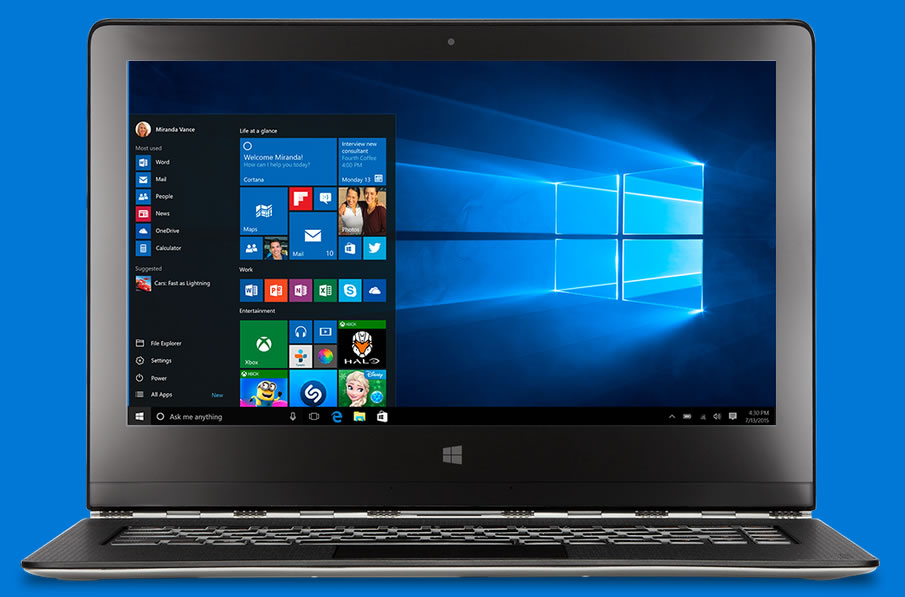
windows10Like many, on Saturday 1st August 2015 I downloaded and installed Windows 10 replacing my Windows 9 operating system.

Largely the download and install went very well.  I worked on a second PC during the update which took over an hour.

On finally installing, a welcome screen invited me to customize Windows 10 or go with the standard configuration.

I chose the standard settings and soon after gazed at my new screen.

Like any new software, there is a learning curve with much to take in and get used to.

Many of the icons are the same as my Windows phone so that helped me getting used to the new look.

windows10-start The START button at the bottom left of the screen is replaced with a white angular Windows icon.  There are new icons that are worth taking a look at including search, task, store and other often-used icons.

The pop-up slider is pleasing to look at, displaying many of the same links and programs as before but with a more icon feel.

Conflicts

I don’t want to poo poo Windows 10 because generally it’s very good.

The issues I faced were minor software glitches that so-far have been easy to fix.

  1. Display resolution was initially 1024×768 which I could not change.  I rebooted the PC and it had changed to the correct 1920×1080.
  2. SHIFT key was not working on PC’s connected with Synergy (shared screen and mouse).  Installed latest version of Synergy fixed it.
  3. Cut & Paste was not working on PC’s connected with Synergy (shared screen and mouse).  Installed latest version of Synergy fixed it.

Links

  • www.microsoft.com
  • ynergy-project.org – Synergy is free software for sharing one keyboard and mouse between multiple computers*.

* Highly recommended.  I have used synergy for years and it gets better and better.  It works fine with multiple pc’s, screens, types of computer (PC and Mac), operating system.  Yes, sure there is the occassional bug, but nothing a quick reboot wont fix.


Please LIKE or tell a friend..


Post Views: 250

Also See..


  • Could not copy file: wordpress
  • Free Software
  • 35 Tips and Tools to make your net time better!
  • WordPress | Plugins & Settings
  • Email Reply Account

Recent Posts

  • How We Solved a Encoding Issue (Thanks to ChatGPT)
  • Windows 11 Not Seeing Keyboard at PIN Login = Fix
  • WooCoomerce: Buy Now + Affiliate Link + Cart – FIXED

About Brian King

Managing director and senior editor at Ripefruit Media

  • Email
  • Facebook
  • Twitter
  • YouTube

For Advertisers

  • Advertising FAQ
  • Contact Us
  • Content Changes
  • Website Network

IT Talk

  • How We Solved a Encoding Issue (Thanks to ChatGPT)
  • Windows 11 Not Seeing Keyboard at PIN Login = Fix
  • WooCoomerce: Buy Now + Affiliate Link + Cart – FIXED
  • Why WP Engine Affiliate program migration from ShareASale to Everflow is a WASTE of time
  • how to hide nvidia pop up
  • Facebook Wishlist: Edit Featured Pin’s
  • What is the best shopping cart?
  • file explorer not responding FIX

Keywords

admin affiliation attack australian avg brute force business cache change domain name ebay email facebook fix form for sale fraud google hosting how to htaccess image ip ip address LastPass mobile password Phishing pin plugin ranking removal remove responsive scam security seo software spam toontown web site website Wordfence wordpress wpmu dev

SiteMap

  • About Us
  • Acceptable Use Policy
  • Advertising
  • Contact Us
  • Digital Publications
  • Domain Names
  • Email
  • Home Page
  • Hosting
  • Internet
  • Publishing
  • Software
  • Technical
  • Search
  • Services
  • Web Design
  • About Us
  • What We Do!
  • Clients
  • IT Talk
  • Contact Us


Copyright © 2025 · Ripefruit

Ripefruit acknowledges and pays respect to Aboriginal and Torres Strait Islander Elders past, present and future. We commit to building a kind future for everyone.